science animation games
The Knowledge Makers

Go to item :

.Home | Products | Subscribe | Catalog | Register | Site Map | My Account | About Us |
Contact Us | FAQ | Announcement | Articles | Downloads | Discounts | Advertise | Feedback
MathematicsPhysics -  Heat, Light, atomic, General Chemistry - Physical,Analytical, Organic, Inorganic ChemistryBiology - Botany, Zoology, Microbiology,ImmunologyHuman Body system : Circulatory, Peripheral,Nervous,Mascular, sexual
  FAQ - Shopping (Product Purchase), download, installation and Refund.


   New User Register


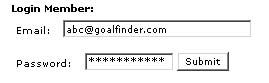
   Login Member:
Email:
Password:

   Site Search
   Advance Search
 
Other animations

    education animation in flash online subscribe and view education animation online Subscribe and view online
Science and tech animation catalog in flash Animation product List
    education animation online in flash Row view of animated science  Row format
    physics, chemistry, biology animation Grid format of education animation  Grid format
    education animation  online catalog of animated education  Flash Format
    educational animation link  List format of educational animation  List format
    education animation link excel sheet of all educational animation in flash  Excel format

View full version -shop / subscribe

» Price list
» Check price in your currency 
» Advantage Shopping
» Advantage Subscription
» Compare shopping & subscription
» Shopping Process
» Payment options
» More details....

» License for school and others


New Discount Section
   Click to access discounts

Free Science Animation
   (Download Product Details) 720 kb

Advertise on Goalfinder
    Now you can advertise on Goalfinder to reach schools, colleges, teachers, parents, students and professionals.

Subscription opens up the site for you, view full length science animation and that too the latest versions, ready access to quizzes, ratings, games etc. Register and login to purchase subscription


We have included topic wise FAQ please go through them and if you have have more questions then contact us.
Last updated on September 27, 2007


  1. Tell me more about Goalfinder?
  2. Tell me step by step how to purchase products from your site ?
  3. How do I login?
  4. Password and username guideline
  5. How do I register?
  6. I am a subscriber do I need to register again for purchasing products ?
  7. How do I check out the product before buying ?
  8. How do I watch its preview?
  9. Do I have to purchase a product to view its full version?
  10. Is registration necessary before buying a product?
  11. Why doesn't the full version button show me the animations ?
  12. Why does clicking on "add-to-cart" takes me to "login" page ?
  13. What is meant by session expire ?
  14. How do I purchase a product?
  15. How will I get the product once I have purchased it ?
  16. How soon will I get the purchased product ?
  17. Is there any other mode of payment?
  18. Can I trust you with my credit card?
  19. How do I install and play the product? ( All the queries regarding animation are in this section )
  20. I am a member does that make me a subscriber?
  21. What happens if I do not access this site for months after becoming a member?
  22. How do I check my product purchase?
  23. Why do you charge for the products ?
  24. Who can I contact in case if I have some problems with purchase?
  25. Can I run the prducts on Macintosh also ?
  26. Compare shopping with subscribing (link)
  27. Advantages of shopping (opens in new window)
  28. What is your Refund Policy?


Goalfinder.com has been selling on web since 1999, we employ people from diverse backgrounds- like engineers, science graduates and post graduates, designers, teachers etc. We are in the business of educational software and selling them through web is one of our initiative. We are located in India.

The company is focussed on creating e-learning content using interactive animation in movie like format.


Tell me step by step how to purchase products from your site?

Step 1 - Login : If you are a member just login, if you are not a member then register first, registration is required for purchasing a product
Step 2 - Select products
Step 3 - Pay for products
Step 4 - Download products
Step 5 - Install products


How do I login?

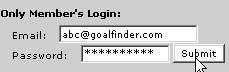
Put your username (*the e-mail address you registered with) and your password (password is not case sensitive "admin" or "Admin" or "ADMIN" are all accepted) in the proper fields in the space shown

Home page, shop and all products page :

Product page : on left hand side menu


Password & username guideline

Password :
A six letter password is safe from hackers, we accept 2 letters also, mix letters and numbers for additional safety, the length of the password should be maximum 25 characters, look at the password and username guideline below :
--The password is NOT case sensitive; so do not worry about caps lock or capital letters.( Admin , ADmin or admin are all same)
---Spaces are not allowed in password ( "Admin" is correct "Ad min" is wrong)
---If you have forgotten your password, use the forgot password link, we will send your password to your email address

Username:
Use the email that you registered on Goalfinder with, not any other e-mail
Your e-mail address cannot contain any spaces.
Be sure you use your e-mail address and not your name.
Be sure to type your full e-mail address, in the format "mailname@provider.com"
If you no longer have access or use your e-mail address, you must still use it to log in. Then later you may change your e-mail address in the myprofile section of your account.


How do I register ?

Click on the register link on the top menu bar

Fill in your details in the dialog box, for password and username refer guidelines in this FAQ . This screen will appear after submitting your details


you have to login again to access the site .


Why do I have to register ?

Registration entitles you to purchase products, subscribe to online viewing, does away with the necessity of filling in key number on product page to view full length animation, receive messages from us in "My Account" and get special discounts. Your address and phone number will help us to contact you, in those cases when your e-mail address is not functional.


I am a subscriber do I need to register again for purchasing products ?

No you need no register again your login and password entitles you to buy products from our site.


How do I check out the product before buying ?

1) You can get a feel of product by going to the product page and looking at the images of the product with description, normally we provide at least 4-5 images with captions.

2) Read the details about the product
3) Watch its preview


How do I watch preview?

A preview is a trailer of the animation created by us so that you can have a look at the product features and animation quality and content before purchasing it, you may watch its preview from

Home page, product page or shop or other pages : button or "preview" link, all the previews open into a new browser page and preview in flash 6.0 format are played into that page most of the previews are small sized few hundred KBs or so but some of them run into 1 -2 MB also, please check the product page for preview size and playing time.

If you cannot see the preview of a file then it is possible that you do not the flash plugin installed in your browser, go to http://www.macromedia.com and install the latest flash player from their site. If even after that the preview is not visible, then contact us.


Do I have to purchase a product to view its full version?

Yes, except for our free products, others have to be purchased prior to viewing their full version .


Is registration necessary before buying a product?
Yes, registration is needed before a product can be purchased.


Why doesn't the full version button show me the animations ?

The full version animations are available for viewing only after you have purchased a subscription account. After purchasing you will be entitled to see the full length animations. To purchase a subscription account click on "subscribe" on top menu after login.


Why does clicking on "add-to-cart" takes me to "login" page ?

There could be a few reasons
1) You have not registered and are not a member, please register and login to access your shopping cart
2) You are a member but have not logged in, please log in to access your shopping cart
3) Your session could have expired, please login again.


What is meant by session expire ?
Login sessions expire for two reasons. For your security, your session expires a maximum of 20 minutes after you have logged in and there has been no mouse movement on the page. Normally if you have logged in and somehow your computer is kept unattended for quite sometime, there is a possibility that misuse of your account can occur in your absence, we try to minimize that misuse by expiring the session after 20 minutes.You can re-login to access your account again.


How do I purchase a product?
Once you have registered and become a member, then1) Login

2) Click on add-to-cart icon in home page, shop or all products page


3) when you click on Add to cart, your shopping cart will appear on page
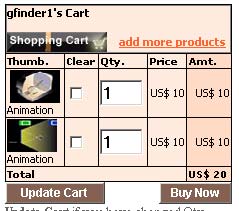

Thumbnail : show a picture of the product in cart, click on thumbnail to go to its product page, the shopping cart will go to whichever page you are in
Legend below thumbnail : specifies the nature of production whether it is an animation, CD or poster
Clear : Check clear and click on update cart to clear that product
Quantity : For multiple licenses you can buy more than 1 quantity ( this option is used by institutional buyers)
Price and amount: As displayed, if you keep the shopping cart parked in your account without purchasing and in the meantime price change then new pricing will be indicated in the shopping cart
Add more products : Takes you to shopping page
Buy now : Proceed to next stage in buying

4) Stage 1 : Modify shopping cart
: In this stage you can modify your shopping cart's product add or remove products change quantity etc. Also here you choose your payment options Credit card is the faster way than demand draft or cheque payment. We are registered with a verisign authorized 128 SSL payment gateway ccavenue that processes all the cards. Please check out the verisign authentication.
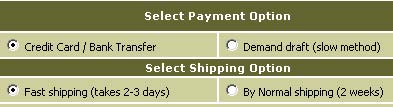
Shipping
is only charged for CDs, posters etc, direct downloading of animation does not require shipping and is not charged even if any shipping option is checked. Animation is downloaded through a link in "my account", section.

For Shippable product the shipping cost/ time will be calculated Ex India for delivery addresses outside India. Shipping is calculated as full shipping for first quantity and 50% for additional quantity Those within India the courier time will be 2-3 days and the charges will be actual charged by national couriers.

5) Stage 2: Delivery address confirmation for shipable products like CD or posters ( all animations are delivered online through a link in "My Account"), here you can change your delivery address, by default it is your registered address, changing the delivery address does not affect your your registered address.

6) Stage 3 : Confirm Order :you can use the browser back button to modify details in stage 1 or 2, the payment is indicated in both US $ and Indian rupees, the your card bank will be sending you the invoice in dollars only
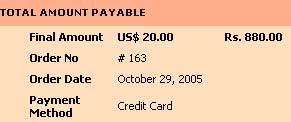


7) Stage 4 : Pay now : Pay through credit card. All credit card transactions are done through leading south asian payment gateway,Ccavenue; a trusted verisign authenticated payment gateway. Click here to verify their certificate. Do check out the payment gateway at http://www.ccavenue.com or click on the logo. Check out our payment security policy from here.

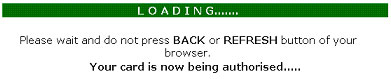
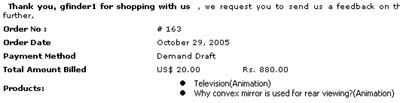
Complete the payment formalities by clicking on next button and you are taken to the verisign authorized 128 bit SSL secure payment gateway after that you are be brought back to the site or if you had chosen the Demand draft option you will be provided with the order no and the particulars relating to the Demand draft posting. In both cases an e-mail is sent to your e-mail address. The payment gateway will show the transaction value in Indian rupees, your credit card statement will show the value in US Dollars or its equivalent value in your currency.
Indication In Indian Rupees : The Indian rupees value is desired by our customers in India, when using direct bank transfer facility option offered by our payment gateway. A value lower than exchange rate is taken to prevent any overcharging due to rate fluctuation during the day.

Confirm exchange rate from the links below
http://www.xe.com
http://finance.yahoo.com/currency/


CREDIT CARD PAYMENT :

CREDIT CARD PROCESSING

DD OR CHEQUE PAYMENT:

How will I get the product once I have purchased it ?
Go to my account :

download your product by clicking on the hyperlink


The product will be available for 10 days in your account from the date of the purchase after which they will be removed.


How soon will I get the purchased product ?

In case of credit card payment immediately, in the case of DD or cheque payment the product will be visible in "My Accounts" only after the payment is credited to our accounts which may be as much as three weeks after dispatch of DD / check to us, we will keep you updated of the status through message in "My Accounts" or e-mail. Contact us through e-mail or phone or messaging service refer contact us for more details.


Is there any other mode of payment?
Refer to our Payment FAQ.


Can I trust you with my credit card?
We realize that making a purchase online involves a great deal of trust on your part. We also take your trust very seriously, and it is on our highest priority to ensure the security and confidentiality of the transaction. We have been in this business since 1999 and have been listed with Network solutions registrar since 2001. We provide our contact information in terms of address, phone, e-mail explicitly on contact us page. Please do cross check, for any doubts that you may have.

All credit card transactions are done through leading south asian payment gateway,Ccavenue; a trusted verisign authenticated payment gateway. Click here to verify their certificate. Do check out the payment gateway at http://www.ccavenue.com or click on the logo. Check out our payment security policy from here.

How do I install and play the product?
Double clicking on the executable (.exe) file will install the Goalfinder animation to your computer.
The following files will be installed :
- Animation file
- Help file
- Icon files
-Player
The default folder is <root >:\program files\Goalfinder\, normally <root> is the C:\ drive.
You can select to install the files to any other folder or drive.
You may choose to install the files to folder of your choice.

How do I access the files:

Once the installation is over, a Goalfinder folder will be created in the programs menu and the files can be accessed from start>programs - From the desktop --- open the "Goalfinder browser" folder OR
- Use the shortcut Shift+Alt+G to open it
- From start menu --- go to the "Goalfinder" folder

How do I run the animation:

Open the animation file by clicking on it, these are self-running executable files and do not require any other software to run them. You can stretch them to full screen size and place them anywhere on the screen.

How do I control the animation ?

You can navigate the animation by using forward button / backward button by either clicking again and again and moving back/ahead 10 frames each time or keeping it pressed for fast forward motion.

You can also use the "menu" button to directly jump to a particular section.

The animation can be paused and played again anytime.

How do I navigate the animation :

The menu are provided inside the animation.

Are the animations scalable ?

Yes the animations are scalable you can resize them dynamically even while they are playing and they will adjust to the frame size you have se

Can I open multiple copies of animation or multiple animations at one time?
Yes depending on your system resources you can open as many copies of the same file or different files as you want.

Can I resize the animation?
Animation can be resized by 1) using the maximize or minimize buttons 2) Dragging out the corners or the sides to dynamically resizing it even while it is playing.

Can I zoom into the animation ?
Right click on the animation and click on the Zoom option to zoom in (or zoom out)

What is the hardware and software requirement for playing the animations?
Macromedia flash player is required for playing these animation The player can downloaded from http://www.macromedia.comHardware : The files normally require 128 MB Ram and Intel PII machines for playing well. But they have been found to be playing with some jerks on 486 machines with 64 MB ram also. The size of monitor is not a constraint as the animation expands to fill the monitor screen and is resolution independent but works best on 800 x 600 or 1024 x 768 . Most of the animation are below 600 kb hence can run on the systems of today without any problem.

Uninstalling the program :

Use the usual remove program from Start menu>Control panel>add remove programs, search for goalfinder folder

What are advanced animations?
The advanced animations are high level animation or simulation clearly marked as in the "shop" and "all products" area and shown as "advanced" on product page. The counter for online viewing in the advanced animation case moves at twice the rate of the normal (non-advanced) animation. For downloaded product the advanced rating is not applicable, it is only applicable for online viewing.

Is there any password for viewing the animations ?

No, it is the same password that you use for login.

Can I pass around the animation to others ?

It is ethically wrong and the installed product will not play on other computers.

Will the animation expire after certain time ?
No, there is no expiry date.


I am a member does that make me a subscriber?
No you have to purchase a subscription account by clicking on subscribe . The full version animations are available for viewing only after you have purchased a subscription account.


What happens if I do not access this site for months after becoming a member?
Nothing much! your membership continues as it is, the products that you put in the shopping cart but did not buy await your arrival, the products already purchased remain in shopping cart for 10 days after which they are removed.


How do I check my product purchase?
Check by going to "My Account".


Why do you charge for the products ?
To fund our efforts to provide you with high quality visual solution to problems in science.


Who can I contact in case if I have some problems with purchase?
Use this link to contact us or send a mail to response@goalfinder.com Please mention your user name (your e-mail id used for login) and if you have the order details then include them also, we will try to provide support at our earliest.

.


Can I run the products on Macintosh also?
No these animation will not run on Mac, please buy the products and write to us indicating your order no, date and the name of the products that you bought, we will immediately send you (hqx) or Macintosh playable version through e-mail.


What is your Refund policy?

To prevent any misunderstanding about the type and content of an animation, we provide pictures, short previews of the animation and short and detailed description in the product page. We provide some samples in our downloads section and "My Account" section to give an idea what the our animation are like, so that a viewer is very sure of the content before he purchases the product or subscribes to online viewing. Hence, refund is not allowed once the product is purchased or online subscription is taken except in special cases mentioned below.

Product Download:
No refunds will be given for software that is delivered via download from the Internet. However, if the software downloaded is defective and does not work, a “replacement” will be sent through email that you registered with on our site, if the problem is brought to our notice within 7 days of purchase.

Contact us :
Address E-mail to : Amit (or to Divya)

E-mail Addresses
: For purchase related queries :

For feedback or general queries
: click on feedback to give online feedback

For contacting us
for anything else click on contact us

Support through yahoo messenger during office hours
(text message only): goalfinder_help@yahoo.com

URL : http://www.goalfinder.com

Address : Goalfinder, A4/302, Parkwayz, Wakad-Thergaon Road, Wakad, Pune -411057, India

Tel : 91-20-46740132 (Office landline Time: 9 AM to 6 PM IST, Mon-Sat)
 
Home | Products | Subscribe | Catalog | Register | Site Map | My Account | About Us | Contact Us | FAQ | Articles | Announcements | Downloads | Discounts | Advertise | Feedback
Copyright ©2007 Goalfinder.com All rights reserved. Copyright | License | Privacy policy | Contact us |